win32 · Шаг 5. Фаза 3 — сборка счётных ядер (H и X)
На этом шаге собираются два счётных ядра под 32 бита:
- tmc_rth.exe — H‑поляризация (о‑мода);
- tmc_rtx.exe — X‑мода (требует задания 6 макросов).
Оба — MFC‑приложения (статическая MFC, MultiByte). Оба линкуются с пятью библиотеками: sfile95, prepr, exprint, TMCIndan, TMCLibError.
Перед сборкой: все 6 библиотек Фазы 1 готовы; конфигурация Release, платформа Win32.
5.0 Что уже сделано в проектах ядер
Правки настроек сборки (.vcxproj/.sln), не код:
- Toolset переключён на v145; добавлены конфигурации (Win32/x64 × Debug/Release).
- Подключён
build\ExeOutput.props; имя exe задаётся через<TargetName>(tmc_rth/tmc_rtx). - Удалены жёсткие пути
E:\WORK\Source\Include,E:\WORK\Lib,OutputFile=c:\tmc\exe\.... - Убрана опция линкера
/MACHINE:I386(несовместима с x64; лишняя и для win32), сняты переопределенияObjectFileName/ProgramDataBaseFileName/PrecompiledHeaderOutputFile=.\Release/иIgnoreAllDefaultLibraries(последняя ломала линковку MFC). - Исправлены пути к общим исходникам: оба проекта ссылались на
..\Tmcrtout\TmcSMatrix.cppи..\Tmcrtout\TmcTtoS.cpp(такой папки нет). Реальные файлы лежат вsrc\viewers\Tmcrtout— пути исправлены на..\..\viewers\Tmcrtout\….
Правка в коде (общая, нужна и для win32) — П‑3:
- В
kernels\PlanarRT_H\PL_GLFUN.CPPиkernels\PlanarRT_X\Pl_glfun.cpp, функцияs_tone(генерация звукового сигнала): современный компилятор удалил интринсики прямого доступа к портамoutp/inp(error C3861). Ветка для Windows 95 (программирование таймера 8253 через порты 0x42/0x43/0x61) заменена на резервныйBeep(freq, time). Эта ветка на современных ОС недостижима (выше по коду для NT уже вызываетсяBeep()иreturn). Звук/частоты считаются как раньше; математика расчётов не затронута. Правка одинакова для win32 и win64.
5.1 tmc_rth.exe — H‑поляризация
- Открыть проект ядра H — файл
PlanRT_H.vcxprojиз папкиsrc\kernels\PlanarRT_H. (У ядерPlanRT_H.slnссылается на новый.vcxproj— открыть можно и решение, но надёжнее открывать сам.vcxproj.) - Конфигурация Release, платформа Win32.
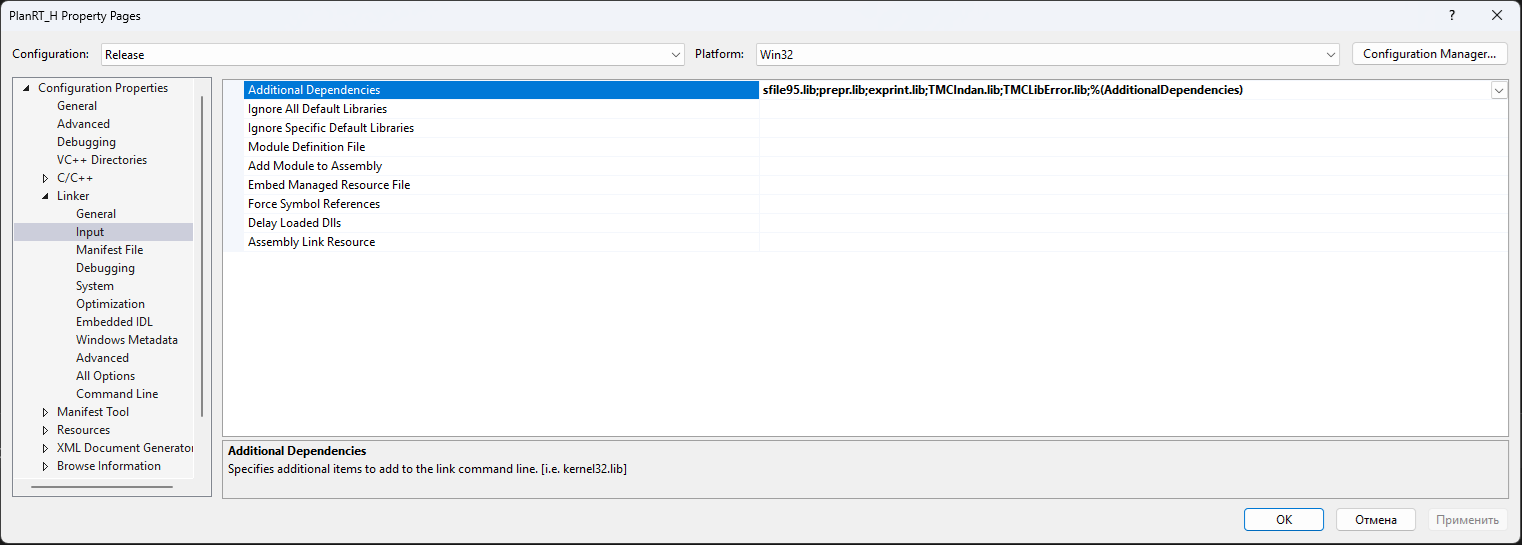
- Проверить линковку: правой кнопкой по проекту → Properties → Linker → Input → Additional Dependencies. Должно быть:
sfile95.lib
   prepr.lib
   exprint.lib
   TMCIndan.lib
   TMCLibError.lib
- Build → Clean Solution (Очистить), затем Build → Build Solution (Собрать).
- Результат:
dist\win32\bin\tmc_rth.exe.
5.2 tmc_rtx.exe — X‑мода (СНАЧАЛА задать 6 макросов!)
X‑мода собирается из тех же исходников, но требует 6 макросов препроцессора. Их
задают только в проекте X‑моды через настройки — НЕ в общих заголовках. Это
принципиально: общие заголовки (Typerth.h, Tmcgrviw.h) используются также H‑модой
и вьюверами, и их правка сломала бы остальные сборки.
Шаг А — задать макросы
- Открыть проект X — файл
PlanRT_X.vcxprojиз папкиsrc\kernels\PlanarRT_X(имя проекта —PlanRT_X, цель сборки —tmc_rtx.exe). Ранее этот файл называлсяPlanRT_H.vcxproj; он переименован вPlanRT_X.vcxproj, чтобы согласоваться с именем проекта и с общим решениемtamic.slnx(см. раздел «Сборка всего сразу через solution»). - Правой кнопкой по проекту → Properties (Свойства).
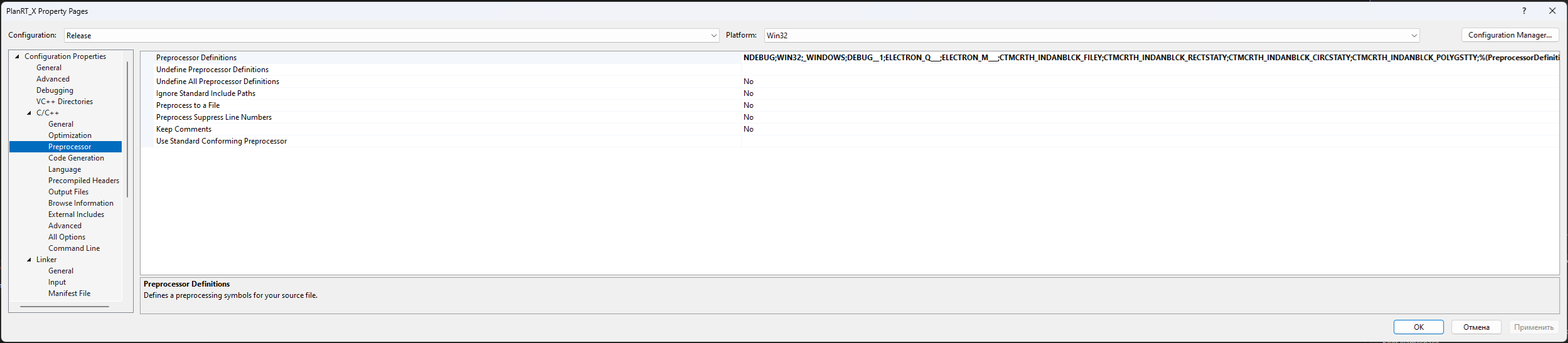
- Раздел C/C++ → Preprocessor → Preprocessor Definitions (Препроцессор → Определения препроцессора).
- Добавить шесть макросов (через точку с запятой), сохранив существующее значение
%(PreprocessorDefinitions)в конце:
ELECTRON_Q___;ELECTRON_M___;CTMCRTH_INDANBLCK_FILEY;CTMCRTH_INDANBLCK_RECTSTATY;CTMCRTH_INDANBLCK_CIRCSTATY;CTMCRTH_INDANBLCK_POLYGSTTY;%(PreprocessorDefinitions)
- Нажать OK.
Эти макросы уже заданы во всех 4 конфигурациях проекта X‑моды. Шаг А нужен, если вы открываете «голый» проект без них.
Назначение макросов
| Макрос | Что включает |
|---|---|
ELECTRON_Q___ |
использование заряда электрона в расчёте X‑моды |
ELECTRON_M___ |
использование массы электрона в расчёте X‑моды |
CTMCRTH_INDANBLCK_FILEY |
блок задания структуры из файла |
CTMCRTH_INDANBLCK_RECTSTATY |
блок прямоугольных включений |
CTMCRTH_INDANBLCK_CIRCSTATY |
блок круглых включений |
CTMCRTH_INDANBLCK_POLYGSTTY |
блок полигональных включений |
Шаг Б — собрать
- Конфигурация Release, платформа Win32.
- Линковка — те же 5 библиотек, что у H‑моды (см. 5.1).
- Build → Clean Solution, затем Build → Build Solution.
- Результат:
dist\win32\bin\tmc_rtx.exe.
Признак, что макросы применились:
tmc_rtx.exeзаметно крупнееtmc_rth.exe— макросы включают дополнительный код типов блоков.
5.3 Проверка Фазы 3
В <КОРЕНЬ>\dist\win32\bin добавились:
tmc_rth.exe
tmc_rtx.exe
Прогоните оба ядра на тестовых наборах из samples\SAMPLE_R.
Историческое примечание о кнопке «Статистика»: ранее в H и X моде при нажатии «View statistics» (Shift+F4) программа молча закрывалась (Баг #1). Этот баг исправлен правкой кода — подробности в
07-troubleshooting.md. Если у вас исходник без этой правки, баг проявится; решение там же.
Если оба ядра собраны — переходите к 06-build-fieldview.md (Фаза 4 — FieldView).
Чек‑лист «что уточнить»
- [ ] Согласовать с автором (К.Н. Климов) физическую трактовку 6 макросов X‑моды.
win32 · Step 5. Phase 3 — building the compute kernels (H and X)
In this step two compute kernels are built for 32 bits:
- tmc_rth.exe — H-polarization (o-mode);
- tmc_rtx.exe — X-mode (requires 6 macros to be set).
Both are MFC applications (static MFC, MultiByte). Both link against five libraries: sfile95, prepr, exprint, TMCIndan, TMCLibError.
Before building: all 6 libraries from Phase 1 are ready; configuration Release, platform Win32.
5.0 What has already been done in the kernel projects
Build-settings changes (.vcxproj/.sln), not code:
- The toolset was switched to v145; configurations were added (Win32/x64 × Debug/Release).
build\ExeOutput.propsis attached; the exe name is set via<TargetName>(tmc_rth/tmc_rtx).- Hard paths
E:\WORK\Source\Include,E:\WORK\Lib,OutputFile=c:\tmc\exe\...were removed. - The linker option
/MACHINE:I386was removed (incompatible with x64; unnecessary for win32 too); the overridesObjectFileName/ProgramDataBaseFileName/PrecompiledHeaderOutputFile=.\Release/andIgnoreAllDefaultLibraries(the last one broke MFC linking) were removed. - Paths to shared sources were fixed: both projects referenced
..\Tmcrtout\TmcSMatrix.cppand..\Tmcrtout\TmcTtoS.cpp(no such folder). The real files are insrc\viewers\Tmcrtout— the paths were fixed to..\..\viewers\Tmcrtout\….
A code change (shared, needed for win32 too) — P-3:
- In
kernels\PlanarRT_H\PL_GLFUN.CPPandkernels\PlanarRT_X\Pl_glfun.cpp, the functions_tone(sound-signal generation): the modern compiler removed the intrinsics for direct port accessoutp/inp(error C3861). The Windows 95 branch (programming the 8253 timer via ports 0x42/0x43/0x61) was replaced with a fallbackBeep(freq, time). This branch is unreachable on modern OSes (higher up in the codeBeep()andreturnare already called for NT). The sound/frequencies are computed as before; the computation math is not affected. The change is identical for win32 and win64.
5.1 tmc_rth.exe — H-polarization
- Open the H-kernel project — the file
PlanRT_H.vcxprojfrom the foldersrc\kernels\PlanarRT_H. (For the kernelsPlanRT_H.slnreferences the new.vcxproj— you can open the solution too, but opening the.vcxprojitself is more reliable.) - Configuration Release, platform Win32.
- Check the linking: right-click the project -> Properties -> Linker -> Input -> Additional Dependencies. It must be:
sfile95.lib
   prepr.lib
   exprint.lib
   TMCIndan.lib
   TMCLibError.lib
- Build -> Clean Solution, then Build -> Build Solution.
- Result:
dist\win32\bin\tmc_rth.exe.
5.2 tmc_rtx.exe — X-mode (SET the 6 macros FIRST!)
The X-mode is built from the same sources, but requires 6 preprocessor macros. They
are set only in the X-mode project via its settings — NOT in the shared headers. This
is essential: the shared headers (Typerth.h, Tmcgrviw.h) are also used by the H-mode
and the viewers, and editing them would break the other builds.
Step A — set the macros
- Open the X project — the file
PlanRT_X.vcxprojfrom the foldersrc\kernels\PlanarRT_X(the project name isPlanRT_X, the build target istmc_rtx.exe). This file was previously namedPlanRT_H.vcxproj; it was renamed toPlanRT_X.vcxprojto match the project name and the combined solutiontamic.slnx(see the "Building everything at once via the solution" section). - Right-click the project -> Properties.
- Section C/C++ -> Preprocessor -> Preprocessor Definitions.
- Add the six macros (separated by semicolons), keeping the existing
%(PreprocessorDefinitions)value at the end:
ELECTRON_Q___;ELECTRON_M___;CTMCRTH_INDANBLCK_FILEY;CTMCRTH_INDANBLCK_RECTSTATY;CTMCRTH_INDANBLCK_CIRCSTATY;CTMCRTH_INDANBLCK_POLYGSTTY;%(PreprocessorDefinitions)
- Click OK.
These macros are already set in all 4 configurations of the X-mode project. Step A is needed if you open a "bare" project without them.
Purpose of the macros
| Macro | What it enables |
|---|---|
ELECTRON_Q___ |
use of the electron charge in the X-mode computation |
ELECTRON_M___ |
use of the electron mass in the X-mode computation |
CTMCRTH_INDANBLCK_FILEY |
block for defining a structure from a file |
CTMCRTH_INDANBLCK_RECTSTATY |
block of rectangular inclusions |
CTMCRTH_INDANBLCK_CIRCSTATY |
block of circular inclusions |
CTMCRTH_INDANBLCK_POLYGSTTY |
block of polygonal inclusions |
Step B — build
- Configuration Release, platform Win32.
- Linking — the same 5 libraries as the H-mode (see 5.1).
- Build -> Clean Solution, then Build -> Build Solution.
- Result:
dist\win32\bin\tmc_rtx.exe.
A sign that the macros were applied:
tmc_rtx.exeis noticeably larger thantmc_rth.exe— the macros enable additional block-type code.
5.3 Verifying Phase 3
In <ROOT>\dist\win32\bin the following were added:
tmc_rth.exe
tmc_rtx.exe
Run both kernels on the test sets from samples\SAMPLE_R.
Historical note about the "Statistics" button: previously in the H and X modes, pressing "View statistics" (Shift+F4) silently closed the program (Bug #1). This bug is fixed by a code change — details in
07-troubleshooting.md. If your source lacks this fix, the bug will appear; the solution is there too.
If both kernels are built, proceed to 06-build-fieldview.md (Phase 4 — FieldView).