win64 · Шаг 1. Что установить
Эта инструкция самодостаточна: для 64‑битной сборки не обязательно читать раздел win32. Требования к ПО те же, что и для win32, плюс несколько отличий для x64, отмеченных ниже.
1.1 Visual Studio
Нужна Microsoft Visual Studio Community 2026 (версия v18.6), набор инструментов компилятора (PlatformToolset) — v145.
Именно эта версия использовалась при реальной сборке (журнал
ISSUES.md).Уточнить версию: точный номер сборки Windows SDK не зафиксирован — см. чек‑лист.
Где скачать
Бесплатный установщик Visual Studio Installer с сайта Microsoft
(visualstudio.microsoft.com).
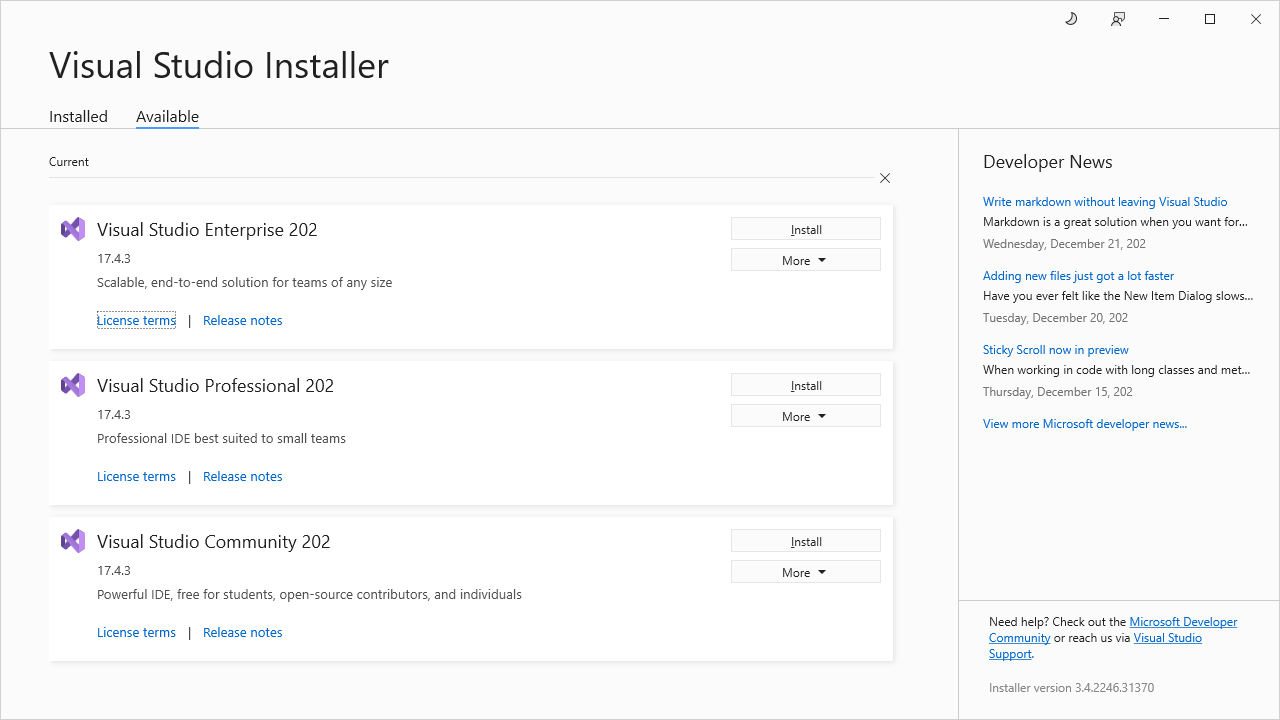
Скриншот общий с инструкцией win32 — установщик Visual Studio от разрядности сборки не зависит.
Компоненты
На вкладке Workloads отметьте:
- Desktop development with C++ (Разработка классических приложений на C++) — обязательно. Современный набор инструментов C++ (toolset v145) включает и 32‑битный, и 64‑битный компилятор — отдельной установки «для x64» не требуется.
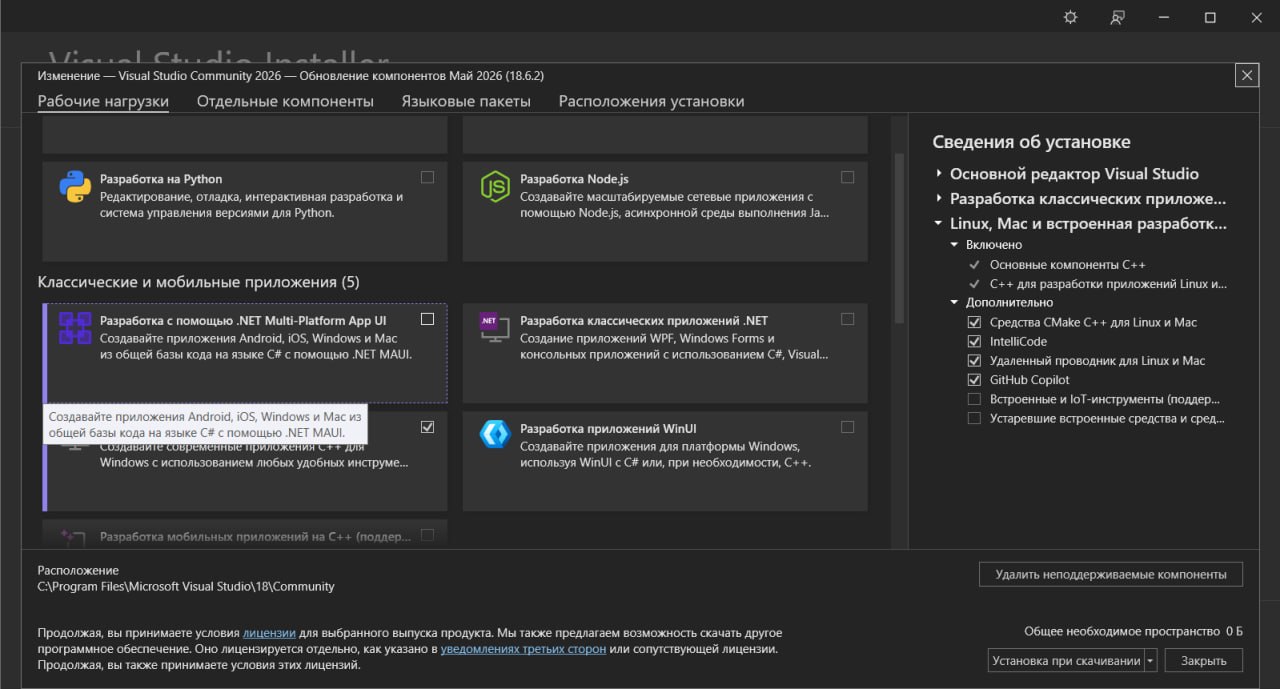
Скриншот общий с инструкцией win32 — рабочая нагрузка C++ (toolset v145) включает и 32‑, и 64‑битный компилятор.
На вкладке Individual components отметьте:
- C++ MFC for latest build tools (x86 & x64) — Microsoft Foundation Classes. Важно, что выбран вариант, включающий x64 (он покрывает обе разрядности). Все программы TMC Suite — MFC‑приложения.
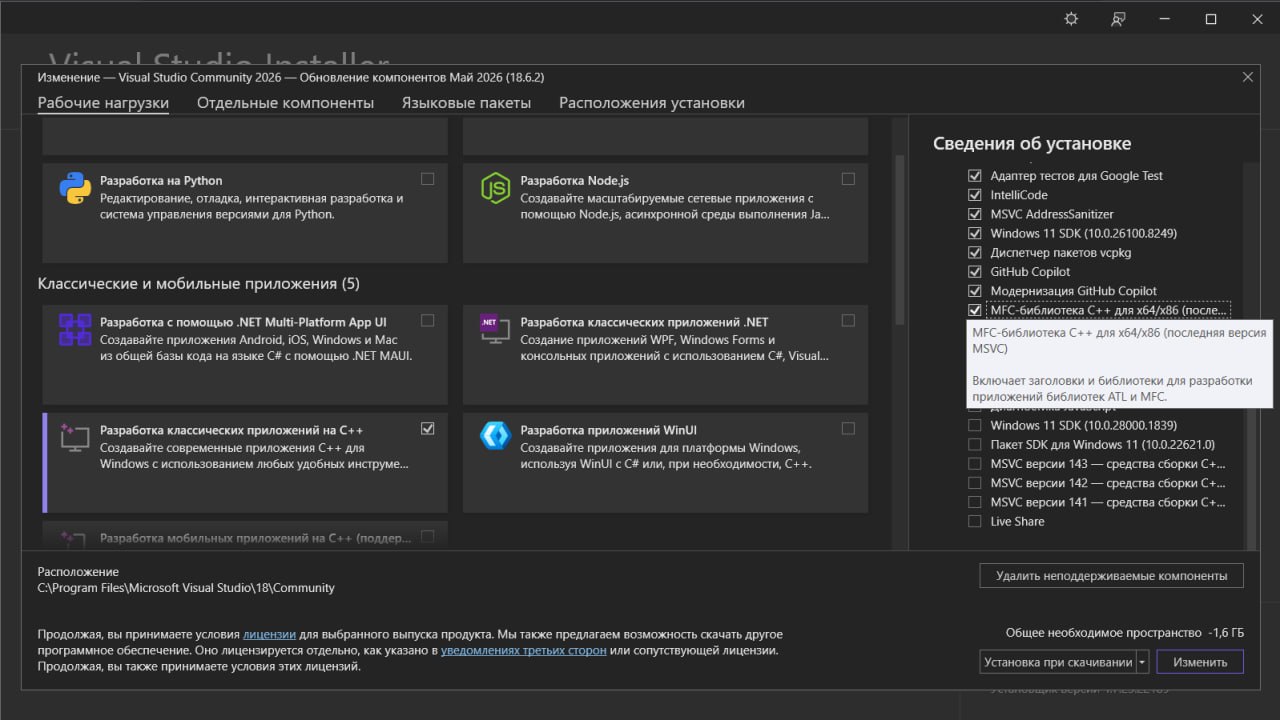
Скриншот общий с инструкцией win32. Убедитесь, что выбран вариант MFC, включающий
x64(«x86 & x64») — он покрывает обе разрядности.
- Windows SDK — комплект средств разработки Windows (источник системных заголовков и библиотек, включая OpenGL). Обычно ставится с рабочей нагрузкой C++ автоматически.
После выбора нажмите Install.
1.2 OpenGL для FieldView (входит в Windows SDK, x64‑часть)
FieldView использует OpenGL. Отдельно ничего ставить не нужно — всё входит в Windows SDK.
Что берётся из SDK для 64‑битной сборки:
- Заголовки
GL.h,GLU.h— подтягиваются автоматически (для x86 и x64 они общие). - Библиотеки линковки:
opengl32.libglu32.lib
Для платформы x64 они берутся из 64‑битной части SDK — папка um\x64.
Важно про имя: отдельной библиотеки «OpenGL64» не существует. Имя файла остаётся
OpenGL32.libи для 64‑битной сборки — просто это другой файл, лежащий вum\x64. В свойствах линкера для обеих платформ указывается одно и то же имяopengl32.lib; нужную разрядность Visual Studio выбирает автоматически по платформе сборки (x64→um\x64).GLAUX (
glaux.h/glaux.lib) в современном SDK отсутствует — в коде FieldView ссылка на неё удалена (правка Ф4‑1). Устанавливать GLAUX не нужно.Уточнить версию: в проекте Windows SDK находился на диске F:; точный номер версии не зафиксирован — см. чек‑лист.
1.3 Настройки линковки MFC и набора символов (информация)
Проекты настроены на статическую линковку MFC и набор символов MultiByte (MBCS).
Эти параметры уже заданы в .vcxproj; менять вручную не нужно.
1.4 Особенность win64: правки кода уже внесены
Исходный код TMC Suite исторически писался под win16/win32. Для 64‑битной сборки в код
внесён ряд точечных правок, связанных только с разрядностью (размер указателя, сигнатуры
функций MFC). Все они уже применены и подробно описаны в журнале
08-porting-changes.md. В шагах сборки 03–06 места применения этих правок отмечены
значком .
Чек‑лист «что уточнить»
- [ ] Точный номер версии (билд) Windows SDK с VS Community 2026.
- [ ] Путь к Windows SDK на конкретной машине (в проекте — диск F:); для x64 OpenGL
берётся из
um\x64.
win64 · Step 1. What to install
This guide is self-contained: for the 64-bit build you do not have to read the win32 section. The software requirements are the same as for win32, plus a few differences for x64, noted below.
1.1 Visual Studio
You need Microsoft Visual Studio Community 2026 (version v18.6), compiler toolset (PlatformToolset) — v145.
This is exactly the version used for the real build (the
ISSUES.mdlog).Clarify the version: the exact Windows SDK build number was not recorded.
Where to download
The free Visual Studio Installer from the Microsoft site
(visualstudio.microsoft.com).
The screenshot is shared with the win32 guide — the Visual Studio installer does not depend on the build bitness.
Components
On the Workloads tab, select:
- Desktop development with C++ — required. The modern C++ toolset (v145) includes both the 32-bit and the 64-bit compiler — no separate "for x64" installation is required.
The screenshot is shared with the win32 guide — the C++ workload (toolset v145) includes both the 32- and the 64-bit compiler.
On the Individual components tab, select:
- C++ MFC for latest build tools (x86 & x64) — Microsoft Foundation Classes. It is important that the variant including x64 is chosen (it covers both bitnesses). All TMC Suite programs are MFC applications.
The screenshot is shared with the win32 guide. Make sure the MFC variant that includes
x64is selected ("x86 & x64") — it covers both bitnesses.
- Windows SDK — the Windows software development kit (the source of system headers and libraries, including OpenGL). It is usually installed with the C++ workload automatically.
After selecting, click Install.
1.2 OpenGL for FieldView (included in the Windows SDK, x64 part)
FieldView uses OpenGL. You do not need to install anything separately — everything is part of the Windows SDK.
What is taken from the SDK for the 64-bit build:
- Headers
GL.h,GLU.h— pulled automatically (they are shared for x86 and x64). - Link libraries:
opengl32.libglu32.lib
For the x64 platform they are taken from the 64-bit part of the SDK — the folder
um\x64.
Important about the name: there is no separate "OpenGL64" library. The file name remains
OpenGL32.libfor the 64-bit build too — it is simply a different file located inum\x64. In the linker properties, for both platforms the same nameopengl32.libis specified; Visual Studio picks the right bitness automatically based on the build platform (x64->um\x64).GLAUX (
glaux.h/glaux.lib) is absent from the modern SDK — the reference to it has been removed from the FieldView code (change F4-1). GLAUX does not need to be installed.Clarify the version: in the project the Windows SDK was on drive F:; the exact version number was not recorded.
1.3 MFC linking and character-set settings (for information)
The projects are configured for static MFC linking and the MultiByte (MBCS)
character set. These parameters are already set in the .vcxproj; you do not need to
change them manually.
1.4 A win64 specific: the code changes are already applied
The TMC Suite source code was historically written for win16/win32. For the 64-bit build a
number of targeted changes related only to bitness (pointer size, MFC function signatures)
were made in the code. They are all already applied and described in detail in the log
08-porting-changes.md. In build steps 03–06 the places where these changes apply are
marked with a wrench icon.