win64 · Шаг 5. Фаза 3 — сборка счётных ядер (H и X)
На этом шаге собираются два счётных ядра под 64 бита:
- tmc_rth.exe — H‑поляризация (о‑мода);
- tmc_rtx.exe — X‑мода (требует 6 макросов).
Оба — MFC‑приложения (статическая MFC, MultiByte). Линкуются с пятью библиотеками: sfile95, prepr, exprint, TMCIndan, TMCLibError.
Перед сборкой: все 6 библиотек Фазы 1 готовы; конфигурация Release, платформа x64.
5.0 Что уже сделано в проектах ядер
Настройки сборки (.vcxproj/.sln): toolset v145; добавлены конфигурации
Win32/x64 × Debug/Release; .sln пересохранены с x64‑платформами; подключён
build\ExeOutput.props; имя exe — через <TargetName> (tmc_rth/tmc_rtx); убраны
жёсткие пути E:\WORK…, c:\tmc\exe\…. Убрана опция /MACHINE:I386 (несовместима с
x64). Исправлены пути к общим исходникам ..\..\viewers\Tmcrtout\…. У X‑моды задан
свой ProjectGuid, чтобы каталоги сборки H и X не пересекались.
Правка кода П‑3 (нужна и для win32, и для win64):
- В
kernels\PlanarRT_H\PL_GLFUN.CPPиkernels\PlanarRT_X\Pl_glfun.cpp, функцияs_tone: интринсики прямого доступа к портамoutp/inpудалены из современного компилятора (error C3861); на x64 прямой доступ к портам в принципе невозможен. Ветка Windows 95 заменена наBeep(freq, time). Ветка на современных ОС недостижима. Математика расчётов не затронута.
Здесь применено изменение — см.
08-porting-changes.md, пункт П‑3.
5.1 tmc_rth.exe — H‑поляризация
- Открыть решение из
src\kernels\PlanarRT_H. - Конфигурация Release, платформа x64.
- Проверить линковку (Properties → Linker → Input → Additional Dependencies):
sfile95.lib
   prepr.lib
   exprint.lib
   TMCIndan.lib
   TMCLibError.lib
- Build → Clean Solution, затем Build → Build Solution.
- Результат:
dist\win64\bin\tmc_rth.exe.
Правка П‑3 применена.
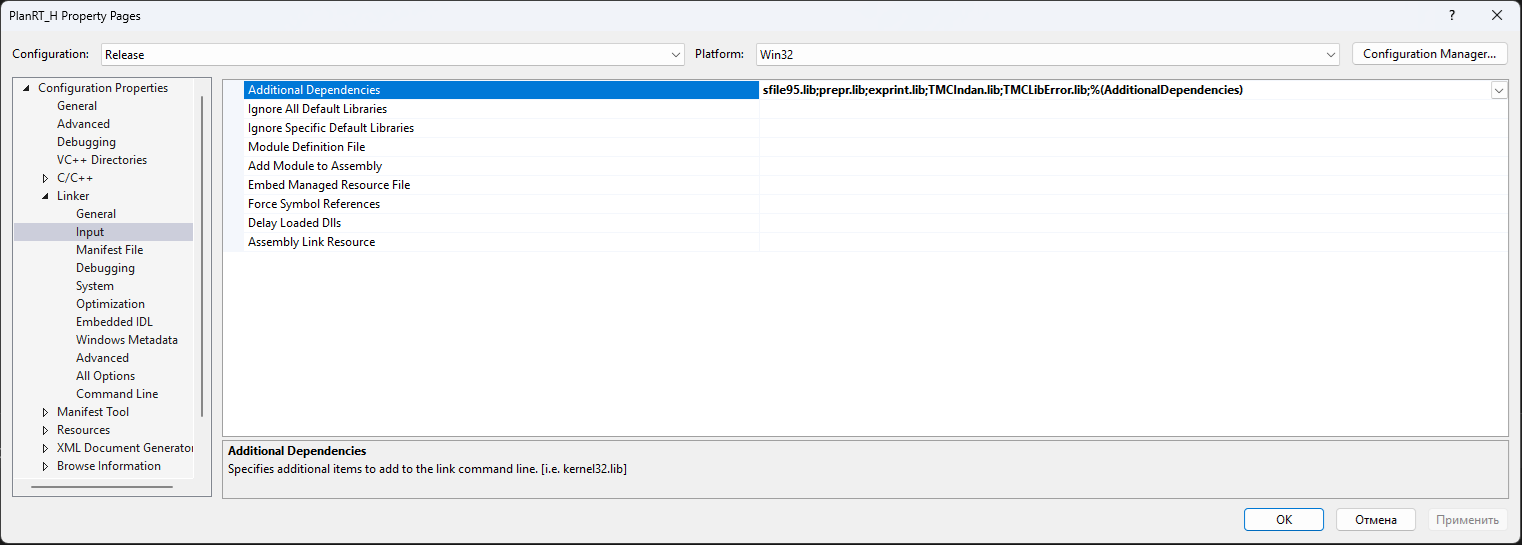
Скриншот общий с инструкцией win32 — список тот же (5 библиотек). Открывайте свойства при выбранной платформе
x64, конфигурацияRelease.
5.2 tmc_rtx.exe — X‑мода (СНАЧАЛА задать 6 макросов!)
X‑мода требует 6 макросов препроцессора, задаваемых только в проекте X‑моды
через настройки — НЕ в общих заголовках (Typerth.h, Tmcgrviw.h используются и
H‑модой, и вьюверами).
Шаг А — задать макросы
- Открыть проект X из
src\kernels\PlanarRT_X. - Правой кнопкой по проекту → Properties.
- C/C++ → Preprocessor → Preprocessor Definitions.
- Добавить шесть макросов (через
;), сохранив%(PreprocessorDefinitions)в конце:
ELECTRON_Q___;ELECTRON_M___;CTMCRTH_INDANBLCK_FILEY;CTMCRTH_INDANBLCK_RECTSTATY;CTMCRTH_INDANBLCK_CIRCSTATY;CTMCRTH_INDANBLCK_POLYGSTTY;%(PreprocessorDefinitions)
- OK. (Эти макросы уже заданы во всех 4 конфигурациях X‑моды, включая x64.)
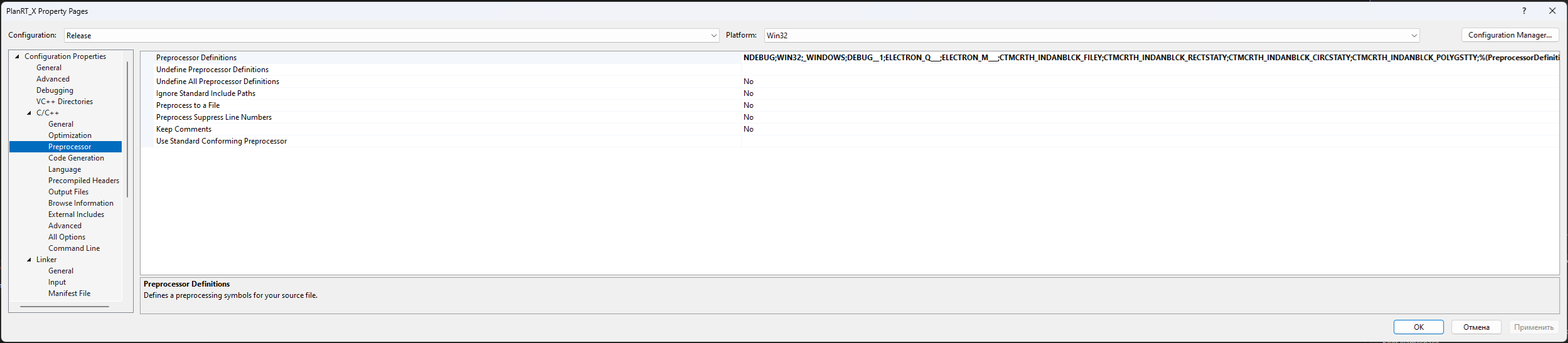
Скриншот общий с инструкцией win32 — набор макросов тот же. Задавайте их при выбранной платформе
x64(макросы уже заданы во всех конфигурациях, включая x64).
Назначение макросов
| Макрос | Что включает |
|---|---|
ELECTRON_Q___ |
использование заряда электрона в расчёте X‑моды |
ELECTRON_M___ |
использование массы электрона в расчёте X‑моды |
CTMCRTH_INDANBLCK_FILEY |
блок задания структуры из файла |
CTMCRTH_INDANBLCK_RECTSTATY |
блок прямоугольных включений |
CTMCRTH_INDANBLCK_CIRCSTATY |
блок круглых включений |
CTMCRTH_INDANBLCK_POLYGSTTY |
блок полигональных включений |
Шаг Б — собрать
- Конфигурация Release, платформа x64.
- Линковка — те же 5 библиотек, что у H‑моды (5.1).
- Build → Clean Solution, затем Build → Build Solution.
- Результат:
dist\win64\bin\tmc_rtx.exe.
Правка П‑3 применена и в X‑моде.
Признак, что макросы применились:
tmc_rtx.exeкрупнееtmc_rth.exe.
5.3 Проверка Фазы 3
В <КОРЕНЬ>\dist\win64\bin добавились tmc_rth.exe, tmc_rtx.exe. Прогоните оба на
тестах samples\SAMPLE_R.
Кнопка «Статистика» (Shift+F4): ранее крашила программу (Баг #1), сейчас исправлена (см.
07-troubleshooting.md). 64‑битные сборки ядер пересобраны с исправлением.
Переходите к 06-build-fieldview.md.
Чек‑лист «что уточнить»
- [ ] Согласовать с автором (К.Н. Климов) физическую трактовку 6 макросов X‑моды.
win64 · Step 5. Phase 3 — building the compute kernels (H and X)
In this step two compute kernels are built for 64 bits:
- tmc_rth.exe — H-polarization (o-mode);
- tmc_rtx.exe — X-mode (requires 6 macros).
Both are MFC applications (static MFC, MultiByte). They link against five libraries: sfile95, prepr, exprint, TMCIndan, TMCLibError.
Before building: all 6 Phase 1 libraries are ready; configuration Release, platform x64.
5.0 What has already been done in the kernel projects
Build settings (.vcxproj/.sln): toolset v145; the Win32/x64 × Debug/Release
configurations were added; the .sln files were re-saved with x64 platforms;
build\ExeOutput.props is attached; the exe name is set via <TargetName>
(tmc_rth/tmc_rtx); hard paths E:\WORK…, c:\tmc\exe\… were removed. The
/MACHINE:I386 option (incompatible with x64) was removed. Paths to shared sources were
fixed to ..\..\viewers\Tmcrtout\…. The X-mode was given its own ProjectGuid so the H
and X build directories do not overlap.
Code change P-3 (needed for both win32 and win64):
- In
kernels\PlanarRT_H\PL_GLFUN.CPPandkernels\PlanarRT_X\Pl_glfun.cpp, the functions_tone: the intrinsics for direct port accessoutp/inpwere removed from the modern compiler (error C3861); on x64 direct port access is impossible in principle. The Windows 95 branch was replaced withBeep(freq, time). The branch is unreachable on modern OSes. The computation math is not affected.
The change is applied here — see
08-porting-changes.md, item P-3.
5.1 tmc_rth.exe — H-polarization
- Open the solution from
src\kernels\PlanarRT_H. - Configuration Release, platform x64.
- Check the linking (Properties -> Linker -> Input -> Additional Dependencies):
sfile95.lib
   prepr.lib
   exprint.lib
   TMCIndan.lib
   TMCLibError.lib
- Build -> Clean Solution, then Build -> Build Solution.
- Result:
dist\win64\bin\tmc_rth.exe.
Change P-3 is applied.
The screenshot is shared with the win32 guide — the list is the same (5 libraries). Open the properties with the
x64platform selected,Releaseconfiguration.
5.2 tmc_rtx.exe — X-mode (SET the 6 macros FIRST!)
The X-mode requires 6 preprocessor macros, set only in the X-mode project via its
settings — NOT in the shared headers (Typerth.h, Tmcgrviw.h are used by the H-mode and
the viewers too).
Step A — set the macros
- Open the X project from
src\kernels\PlanarRT_X. - Right-click the project -> Properties.
- C/C++ -> Preprocessor -> Preprocessor Definitions.
- Add the six macros (separated by
;), keeping%(PreprocessorDefinitions)at the end:
ELECTRON_Q___;ELECTRON_M___;CTMCRTH_INDANBLCK_FILEY;CTMCRTH_INDANBLCK_RECTSTATY;CTMCRTH_INDANBLCK_CIRCSTATY;CTMCRTH_INDANBLCK_POLYGSTTY;%(PreprocessorDefinitions)
- OK. (These macros are already set in all 4 X-mode configurations, including x64.)
The screenshot is shared with the win32 guide — the macro set is the same. Set them with the
x64platform selected (the macros are already set in all configurations, including x64).
Purpose of the macros
| Macro | What it enables |
|---|---|
ELECTRON_Q___ |
use of the electron charge in the X-mode computation |
ELECTRON_M___ |
use of the electron mass in the X-mode computation |
CTMCRTH_INDANBLCK_FILEY |
block for defining a structure from a file |
CTMCRTH_INDANBLCK_RECTSTATY |
block of rectangular inclusions |
CTMCRTH_INDANBLCK_CIRCSTATY |
block of circular inclusions |
CTMCRTH_INDANBLCK_POLYGSTTY |
block of polygonal inclusions |
Step B — build
- Configuration Release, platform x64.
- Linking — the same 5 libraries as the H-mode (5.1).
- Build -> Clean Solution, then Build -> Build Solution.
- Result:
dist\win64\bin\tmc_rtx.exe.
Change P-3 is applied in the X-mode too.
A sign that the macros were applied:
tmc_rtx.exeis larger thantmc_rth.exe.
5.3 Verifying Phase 3
In <ROOT>\dist\win64\bin the files tmc_rth.exe, tmc_rtx.exe were added. Run both on
the tests in samples\SAMPLE_R.
The "Statistics" button (Shift+F4): previously crashed the program (Bug #1), now fixed (see
07-troubleshooting.md). The 64-bit kernel builds were rebuilt with the fix.
Proceed to 06-build-fieldview.md.